Tools
- Electron
- React 19
- TypeScript
- SQLite
- Drizzle
- node-pty
- xterm.js
- tmux
- CodeMirror
Overview
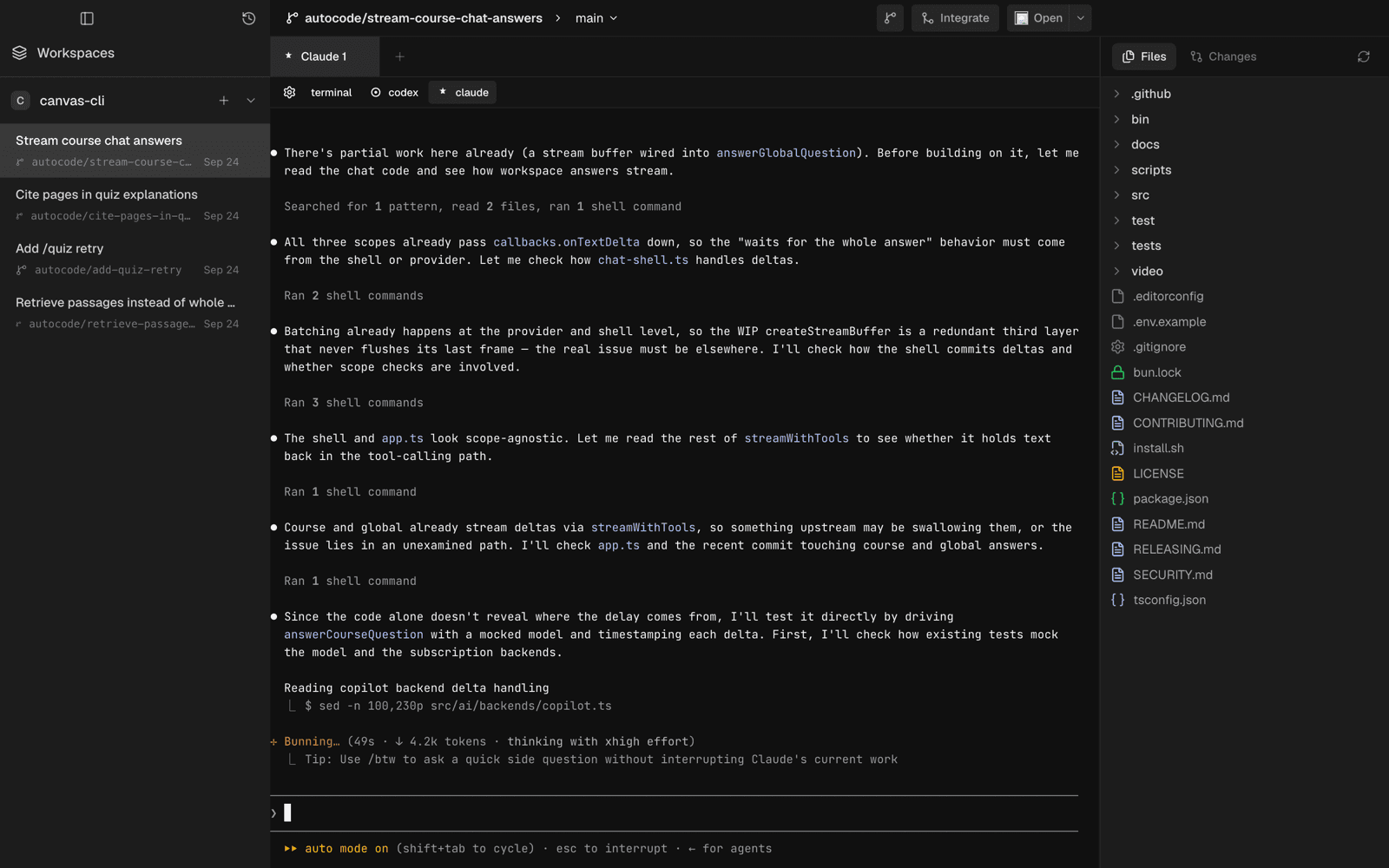
Autocode is a local-first desktop app for running coding agents. Every task gets its own git branch and worktree, and Claude Code, Codex, or a plain terminal works inside it. You review the changes, integrate work from other tasks, and push a pull request without leaving the task. Tasks survive restarts, and so do the agents running in them.
Team
The Problem
Coding agents are good enough now that the bottleneck is no longer the agent. It is everything around it. You start Claude Code in your repository, it begins editing, and now your working copy belongs to it. Start a second agent on something else and the two are writing into the same files. Carry on with your own work and you are editing underneath both of them.
The usual workarounds are a pile of terminal tabs, a stash you hope you remember, and a branch named after whatever you were thinking at the time. When the terminal closes, the conversation that explains why the code looks the way it does goes with it, and a week later nobody can say which change came from which attempt.
The Rule
A task is a place, not a prompt. Creating a task makes a workspace: a branch, a directory, and a record that outlives the session that created it.
Everything else follows from that. Agents run inside a task rather than beside your checkout, so two of them can never share a mutable working directory. Reopening a task is instant because nothing is recomputed; the branch, the worktree, and the sessions are already there. And the app refuses to drift into either of the things it sits between. It is not a chat window, and it is not trying to replace your editor, which is one click away through the Open menu.
Tasks and Worktrees
Add a local repository and it becomes a project. Create a task in it and Autocode derives a branch from the title, such as autocode/stream-course-chat-answers, and runs git worktree add into its own data directory rather than your repository’s. The task is a full checkout of the project at its base branch, with its own index and its own HEAD, that nothing else touches.
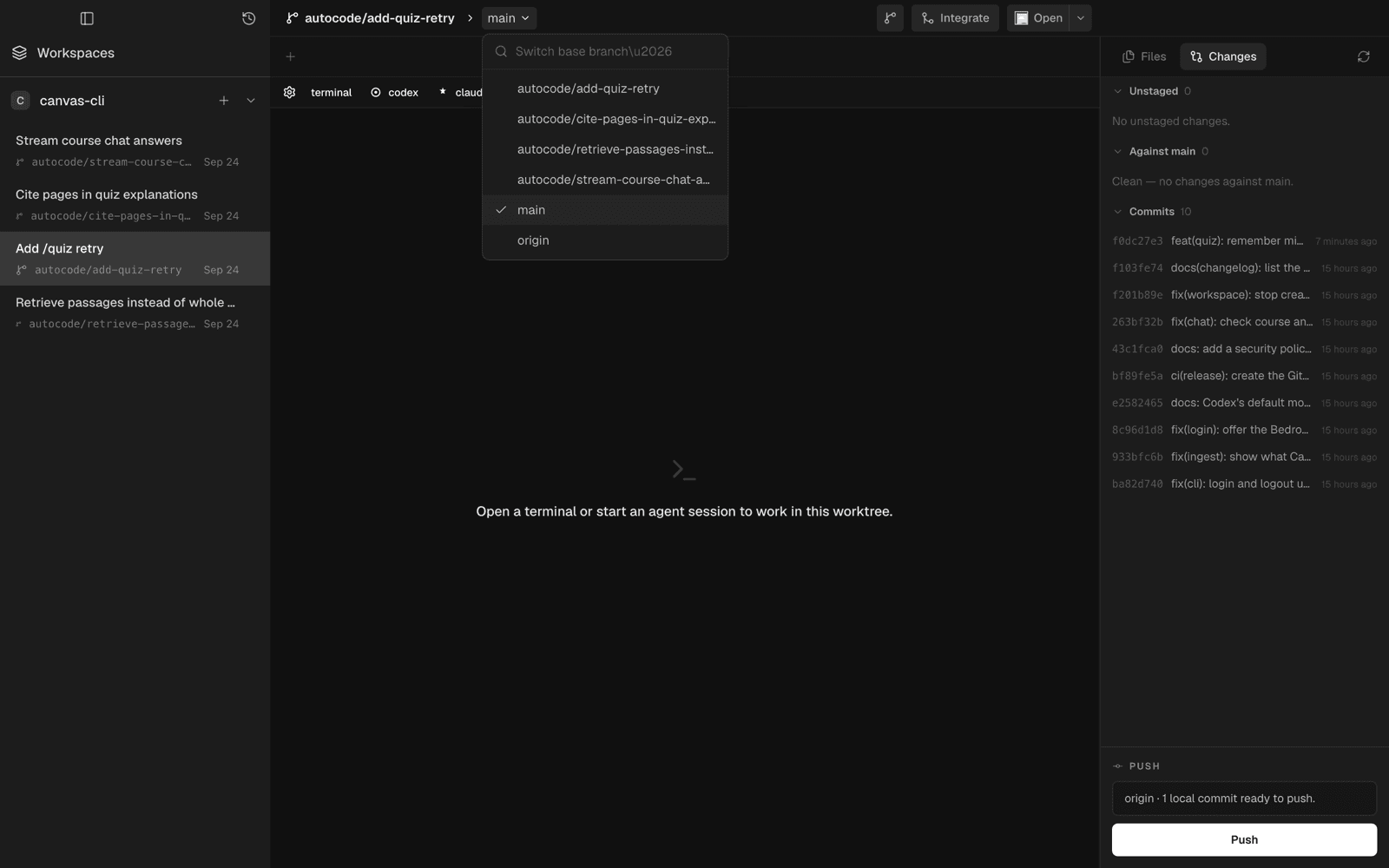
A task can also start from another task instead of from main. That is how stacked work happens: build the quiz retry in one task, then open a second task on top of its branch to add citations, and each one reviews and ships on its own. The base can be switched later from any branch in the repository, and the choice is saved with the task.
Agent Sessions
Inside a task, one click starts Claude Code, Codex, or a terminal, each in the task’s worktree through a real pseudo-terminal rendered with xterm.js. The agent opens with the task’s title and description already in its prompt, so the task is the brief. A task can hold several sessions at once, as tabs, next to files open in the editor, and each tab names itself after the prompt or the last command it ran.
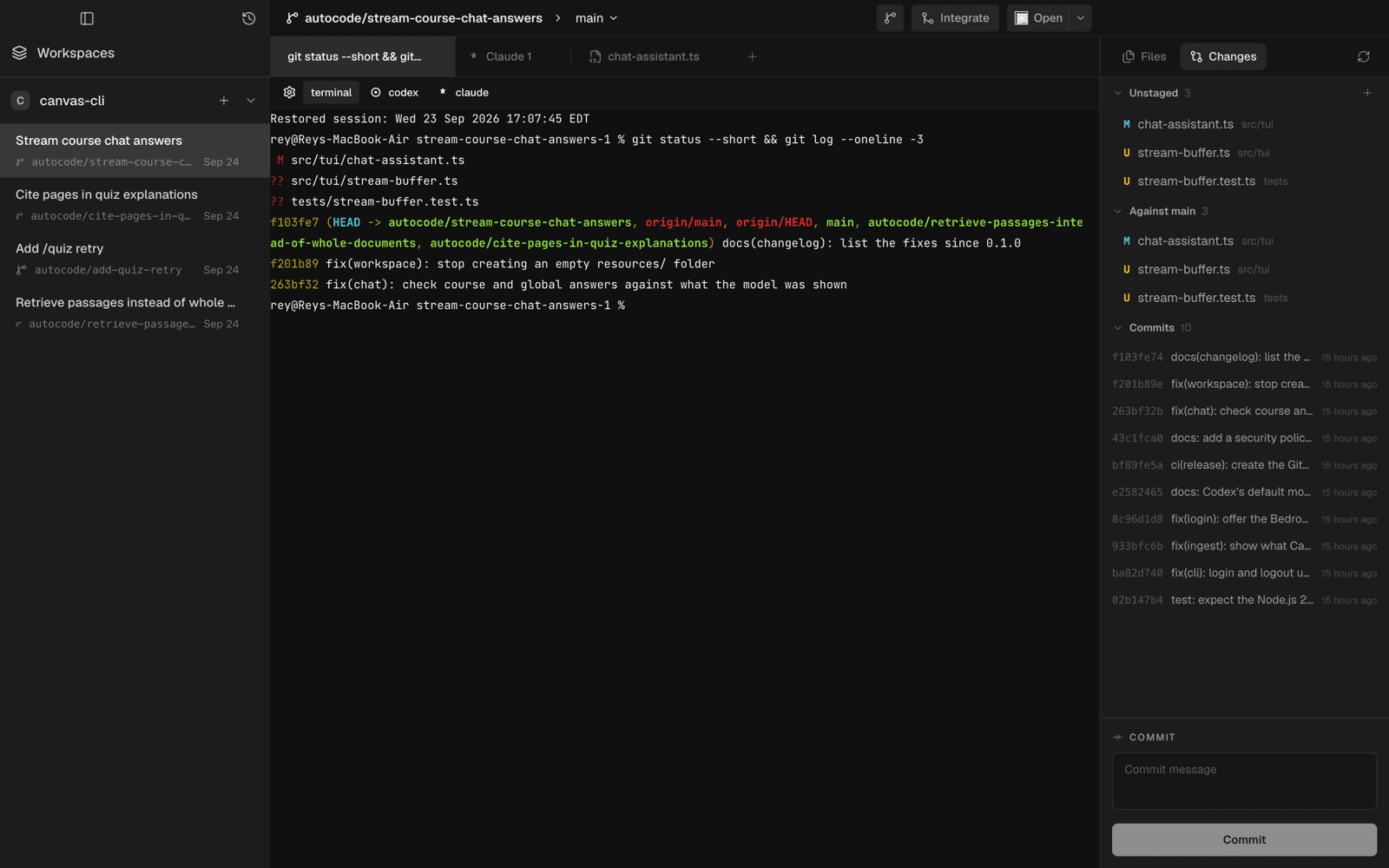
Every session keeps a transcript, and the workspace watches for its output. While an agent is writing, the changes panel refreshes at most once a second, so the diff moves as the agent works without the app rescanning git on every keystroke.
Review
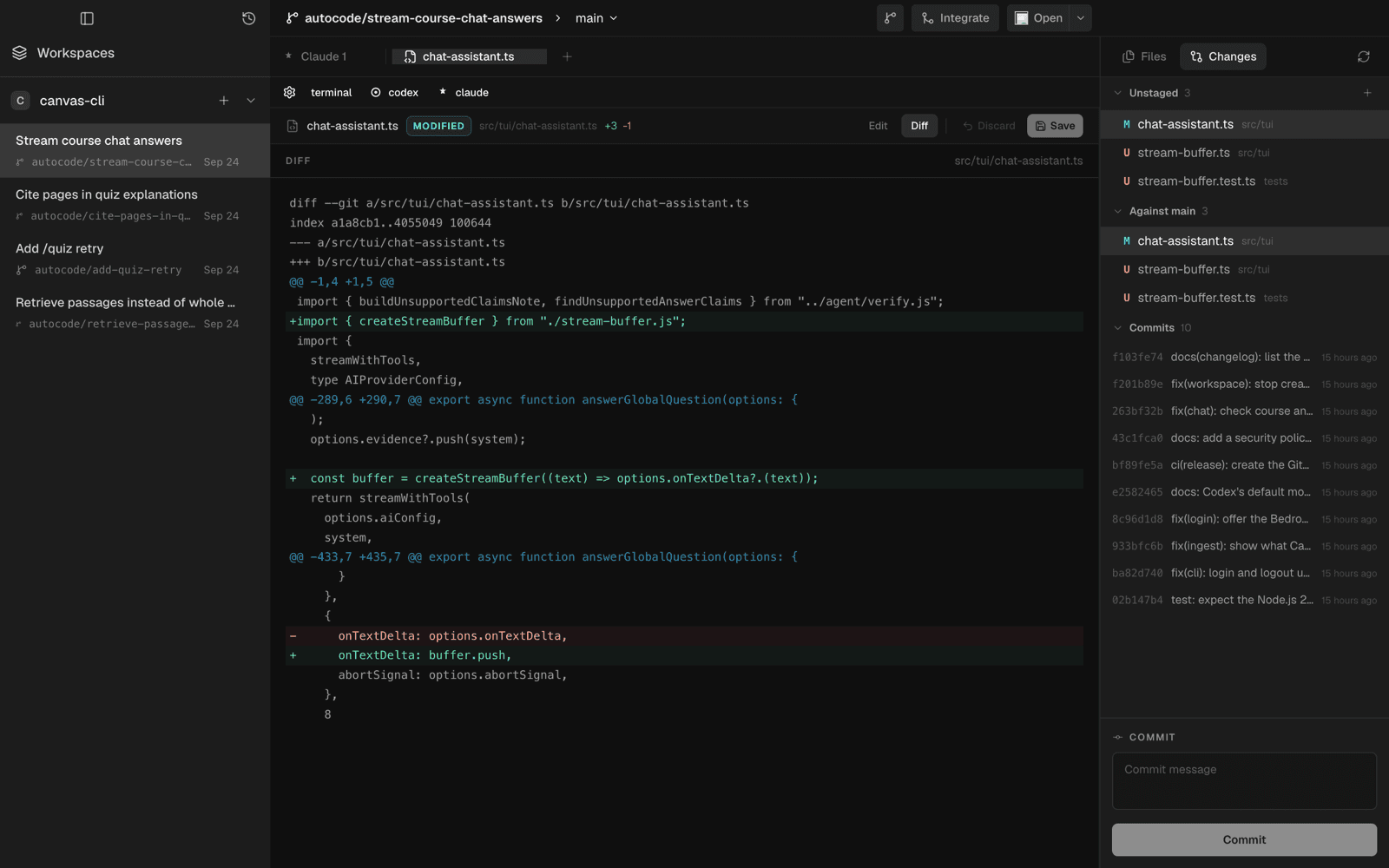
The right-hand panel is the task’s version of a pull request before there is one. It lists what the agent changed, the recent commits, and a commit box. Selecting a file opens its diff as a tab, and one toggle turns that diff into a CodeMirror editor with the right language loaded on demand, so fixing the one line the agent got wrong does not mean switching apps.
Edits are guarded, because an agent may be writing to the same file. A save sends the content you started from along with your change, and the main process refuses it if the file on disk no longer matches, asking you to reload and review the newer edits instead of overwriting them. Navigating away from unsaved changes asks first. When a change needs more than a quick fix, Open sends the worktree to Cursor, VS Code, or Finder.
Integration
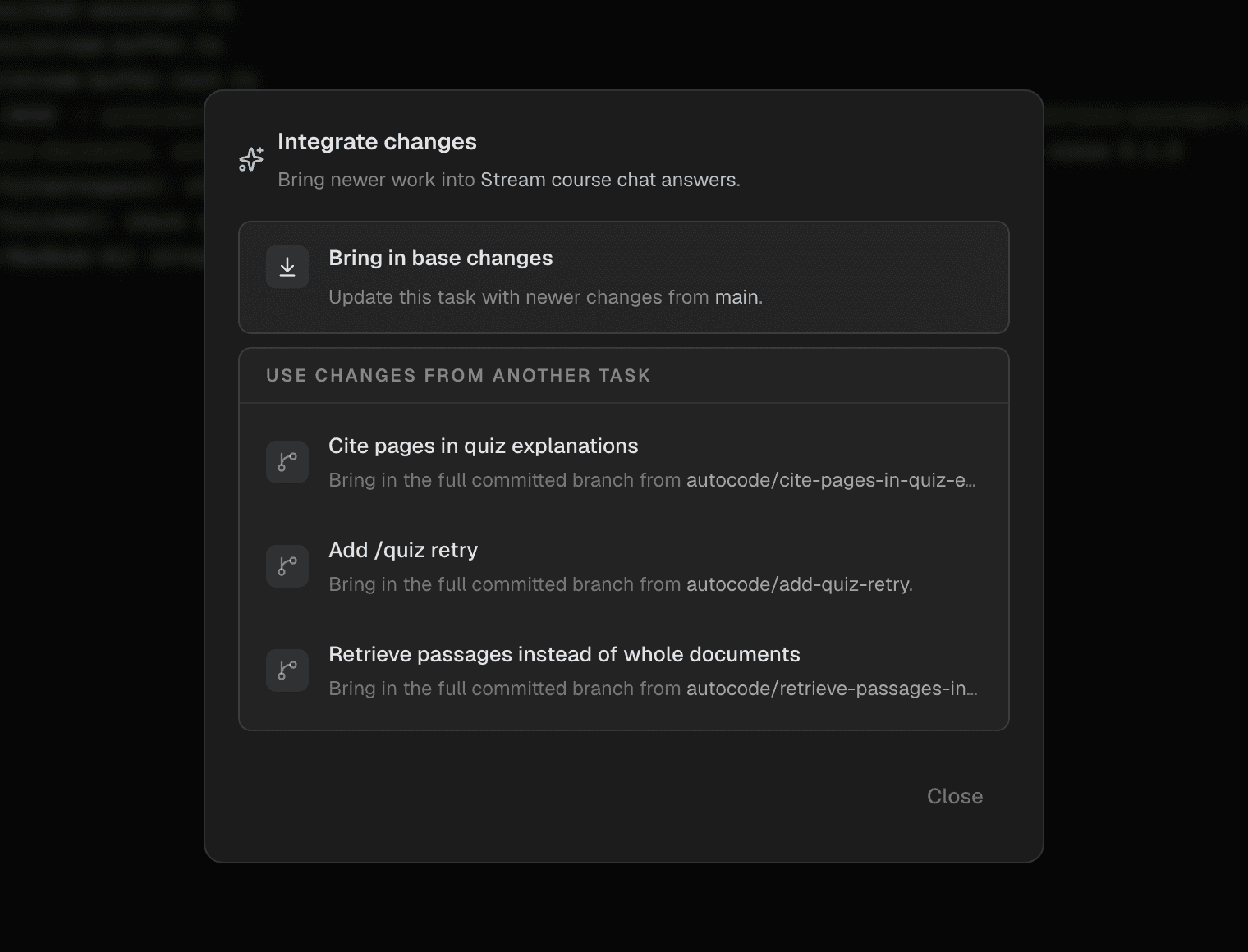
Tasks drift, and so does main. Integrate brings newer work into a task in two ways: the base branch’s latest changes, or the full committed branch of any other task in the same project. It refuses to start while the task has uncommitted changes, and if the merge conflicts, the task is marked dirty with a message that says what conflicted, so you resolve it in the worktree and carry on.
Shipping goes through the GitHub CLI. Push publishes the task branch with an explicit refspec, and the pull request is opened against the task’s base, which for a stacked task is the task underneath it rather than main. Its title and body come from the task, and once it exists the task shows its state and opens it in the browser.
Architecture
Autocode is an Electron app with a hard line through the middle. The main process owns every side effect: the filesystem, git, SQLite, and the pseudo-terminals. The React renderer never touches any of them directly. It calls a small preload bridge whose channels are typed contracts in a shared folder, and every payload is validated with Zod in both directions, so a malformed response from the main process fails as loudly as a malformed request from the renderer.
Durable state lives in SQLite through Drizzle: projects, tasks, worktrees, and agent sessions, with migrations applied on startup. TanStack Query holds everything that comes from the main process, and Zustand only holds what is on screen, such as the selected task. A task’s status never exists only in the renderer.
Provisioning
Creating a workspace is two steps, and the order matters. The task and its planned worktree are written to the database first, marked as provisioning, and only then does git run. If the app dies halfway, the plan is still on disk, and on the next launch every task left in that state is reconciled in parallel: a worktree git already knows about is adopted, and anything else is provisioned again.
Failure is just as deliberate. A worktree is only cleaned up if this attempt created it, so a failed retry never deletes something that was already there, and the task keeps the error so the sidebar can say what went wrong.
let provisionedWorktree: ProvisionedWorktree | null = null;

try {
	provisionedWorktree = await gitWorktreeService.createTaskWorktree({
		plannedWorktree: resolveTaskWorktreePlan(taskWorkspace),
		project,
		task: taskWorkspace.task
	});

	return taskWorkspaceRepository.finalizeTaskWorkspace({
		baseRef: provisionedWorktree.baseRef,
		branchName: provisionedWorktree.branchName,
		projectId: project.id,
		taskId: taskWorkspace.task.id,
		timestamp: new Date().toISOString(),
		worktreePath: provisionedWorktree.worktreePath
	});
} catch (error) {
	const message = extractErrorMessage(error);

	// Only removes the worktree if this attempt created it.
	await cleanupProvisionedWorktree(gitWorktreeService, project, provisionedWorktree);
	taskWorkspaceRepository.markTaskFailed(taskWorkspace.task.id, message, new Date().toISOString());

	throw new Error(message);
}
src/main/services/task-workspace-creation-service.ts — provision, then finalize or record the failure.
Base refs get the same care. The preferred base is checked before use, falling back from the default branch to its remote copy to HEAD, and a repository with no commits is refused with a message saying so rather than a git error. Branch names that are already taken get a numbered suffix instead of silently reusing someone else’s ref.
Surviving Restarts
An agent halfway through a refactor should not die because you quit the app. So when tmux is installed, each session runs inside its own tmux session on a dedicated socket, kept apart from any tmux you use yourself, and the app only attaches to it. Closing Autocode kills the attachment, not the agent.
async function handleRuntimeExit(sessionId: number, exitCode: number, provider: AgentProvider) {
	const sessionName = tmuxSessionNames.get(sessionId);

	if (sessionName) {
		const alive = await runtimeDependencies.isTmuxSessionAlive(sessionName);

		if (alive) {
			// The tmux attach process disconnected (app closing or crash),
			// but the agent is still running inside tmux. Remove the dead
			// runtime without finalizing so reconcile can reconnect later.
			runtimes.delete(sessionId);
			// ...reattach to the same tmux session
			return;
		}

		tmuxSessionNames.delete(sessionId);
	}

	const displayName = getAgentProviderDisplayName(provider);
	await finalizeSession(sessionId, {
		exitCode,
		killRuntime: false,
		lastError: exitCode === 0 ? null : `${displayName} exited with code ${exitCode}.`,
		status: exitCode === 0 ? "completed" : "failed"
	});
}
src/main/services/agent-session-runtime-manager.ts — the attachment exited, but did the agent?
On launch, every session the database still thinks is running is checked. A live one is reattached and a line is written into its transcript saying so. One that is gone is closed as interrupted, with the reason, instead of pretending to still be running. Without tmux, sessions run directly and end with the app, and the same reconciliation records that honestly.
Transcripts are append-only JSON lines with a sequence number, and all the writes for one session go through a single queue, so input, output, and system messages land in order even when they arrive together. Reopening a long session reads the file backwards in chunks until it has the last screenful, rather than parsing the whole thing. If a tmux session cannot be cleaned up after a failed start, Autocode refuses to fall back to a second process, because two copies of the same agent in one worktree is exactly what the app exists to prevent.
Boundaries
Every file request from the renderer names a task and a relative path, and the main process resolves it twice: once as a path, and again after following symlinks, so a link inside the worktree cannot point the editor at the rest of your disk. The window runs with context isolation on and Node integration off.
An app launched from the Dock does not get your shell’s PATH, which is where Claude Code and Codex usually live. Rather than asking you to fix that, Autocode searches your PATH plus the usual install locations, resolves each CLI once, and caches the result, and a missing CLI surfaces as “not installed or not on PATH” rather than a spawn error.
Performance
A terminal-first app is judged on how it feels while output is pouring in. After the features landed, a series of passes went at the hot paths: memoising diff line splitting, debouncing resize observers, hoisting the editor and terminal themes out of render, caching directory snapshots in the file explorer, loading the inspector and editor lazily, and running startup reconciliation and session cleanup in parallel. Refreshes are scoped to the task that changed, so an agent working in one task never repaints another.
Design
It looks like an IDE on purpose, because that is where the work ends up. Three columns: tasks on the left, sessions and files as tabs in the middle, and the worktree’s files and changes on the right. The palette is near-black and quiet, so the colour on screen is the agent’s output and the diff, not the chrome around it.
The details lean the same way. Tabs are rectangular, file types get their own icons, and each agent tab carries its tool’s mark. The provider bar is a row of three words, terminal, codex, and claude, rather than a menu, because starting a session should cost one click.
Decisions
Run the CLIs, don't call the models
Autocode never talks to a model API. It runs the agents you already use, signed in the way you already are, so it inherits their improvements for free and never holds a key. The cost is that it can only see what a terminal shows, which is why sessions are recorded as transcripts rather than structured tool calls.
tmux over a custom daemon
Keeping agents alive across restarts needs something that outlives the app. A background service of Autocode’s own would have meant a second program to install, update, and debug. tmux already does it, on a socket of its own, and when it is missing the app still works, just without that one guarantee.
Sandbox off, for now
The renderer runs with context isolation and without Node, but the Electron sandbox is disabled so the preload bridge behaves the same in development and packaged builds. It is written down as a temporary compatibility choice, not a default to forget about.
What’s Next
Review is next. The changes panel shows what is uncommitted and the recent history, but a task’s real diff is everything on its branch since its base, and that is the view a reviewer needs before a pull request exists. Close behind is waiting for an agent to be ready before handing it the task, so the brief never lands in a startup prompt.
After that, packaged and signed builds, and more than one agent on a task at the same time with a way to compare their attempts. The foundation is already shaped for it: every attempt is a branch, every session is a transcript, and integrating one task into another is a single dialog.