Tools
- React 19
- TypeScript
- Vite
- Supabase
- PostgreSQL
- Deno
- Gemini
- Playwright
- Vercel
Overview
StudyUp is a study workspace for university students. Courses, assignments, notes, and uploaded material live in one place, with a planner for the weeks ahead and a Gemini tutor that answers from the material you have added. It won the Lovable x Roam International Hackathon, and a year later it was rebuilt underneath into something that can safely hold real students’ files.
Team
The Problem
A student’s semester is spread across five tools that do not know about each other. The syllabus is a PDF in the course portal, deadlines are in a calendar, notes are in a notebook app, lecture slides are in a cloud drive, and whatever is actually doing the explaining is a general-purpose chatbot in another tab.
That last one is the real gap. A generic assistant can explain Fourier series in the abstract, and it has no idea what your lab handout asks for, when it is due, or what your professor called the thing. So you paste the handout in, lose the conversation when the tab closes, and do it all again next week. The help exists. It is just never attached to the coursework it is supposed to help with.
Four Hours
StudyUp started at the Lovable x Roam International Hackathon, hosted by UTMIST. The team found the idea at the Myhal Centre, looking back at their own late nights and how scattered their studying had become. With less than four hours left on the clock, the team committed to one product: a single place to organise academic life, with help from Gemini that could see all of it.
Most of that first version was built through Lovable, the event’s sponsor, from prompts, and 127 of the repository’s commits are Lovable’s. It was pitched to a panel of industry judges and won the hackathon overall.
What a four-hour build does not have is anything behind the demo. The tutor function accepted requests from any origin and fetched whatever URL it was handed, course files sat in a public bucket, and nothing capped what one account could spend on Gemini. That was the right trade for a weekend and the wrong one for anything holding real coursework, which is what most of this page is about.
The Rule
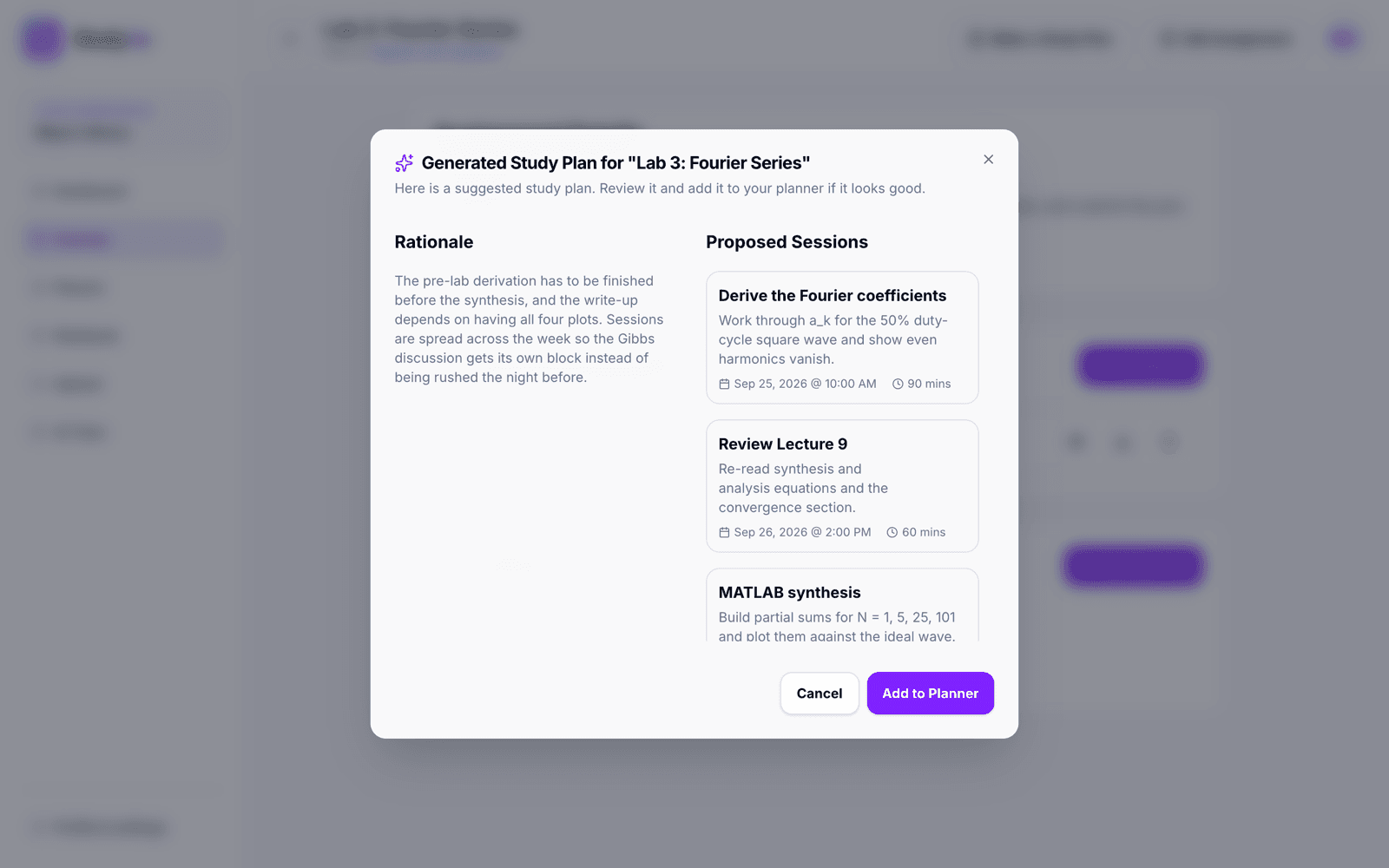
The model proposes, and the student decides. Nothing Gemini writes lands in your workspace until you put it there.
A study plan arrives as a proposal with its reasoning, and only reaches the planner when you add it. A summary sits beside your note instead of replacing it. A tutor conversation is gone when you leave unless you save it, and you choose which assignment it belongs to. That matters more in a study tool than almost anywhere else. The workspace is meant to reflect what you actually understand, and if a model could quietly fill it in, it would stop being a reliable record of where you are.
The Workspace
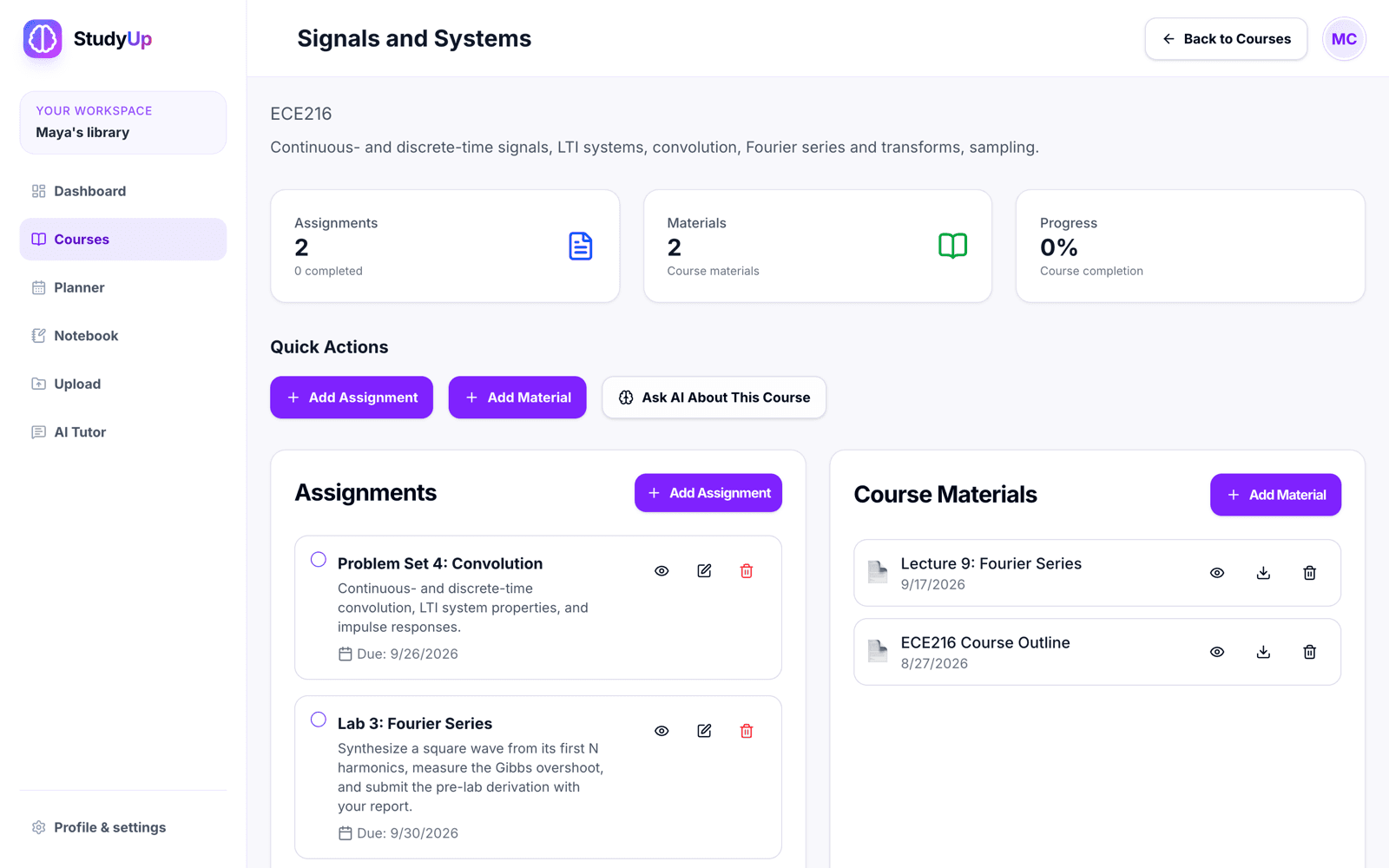
Everything hangs off a course. Each one carries its code and description, its assignments with due dates and a completion state, and its materials: lecture slides, handouts, readings, and images, uploaded to the course as a whole or to a single assignment. The dashboard rolls it up into what is due this week and what is done.
When a PDF is uploaded, its text is extracted in the browser with pdf.js, up to a hundred pages, and stored alongside the file. The tutor can read the material later without the server ever parsing a document, and a scanned PDF with no text layer simply arrives with nothing to read rather than failing the upload.
The Tutor
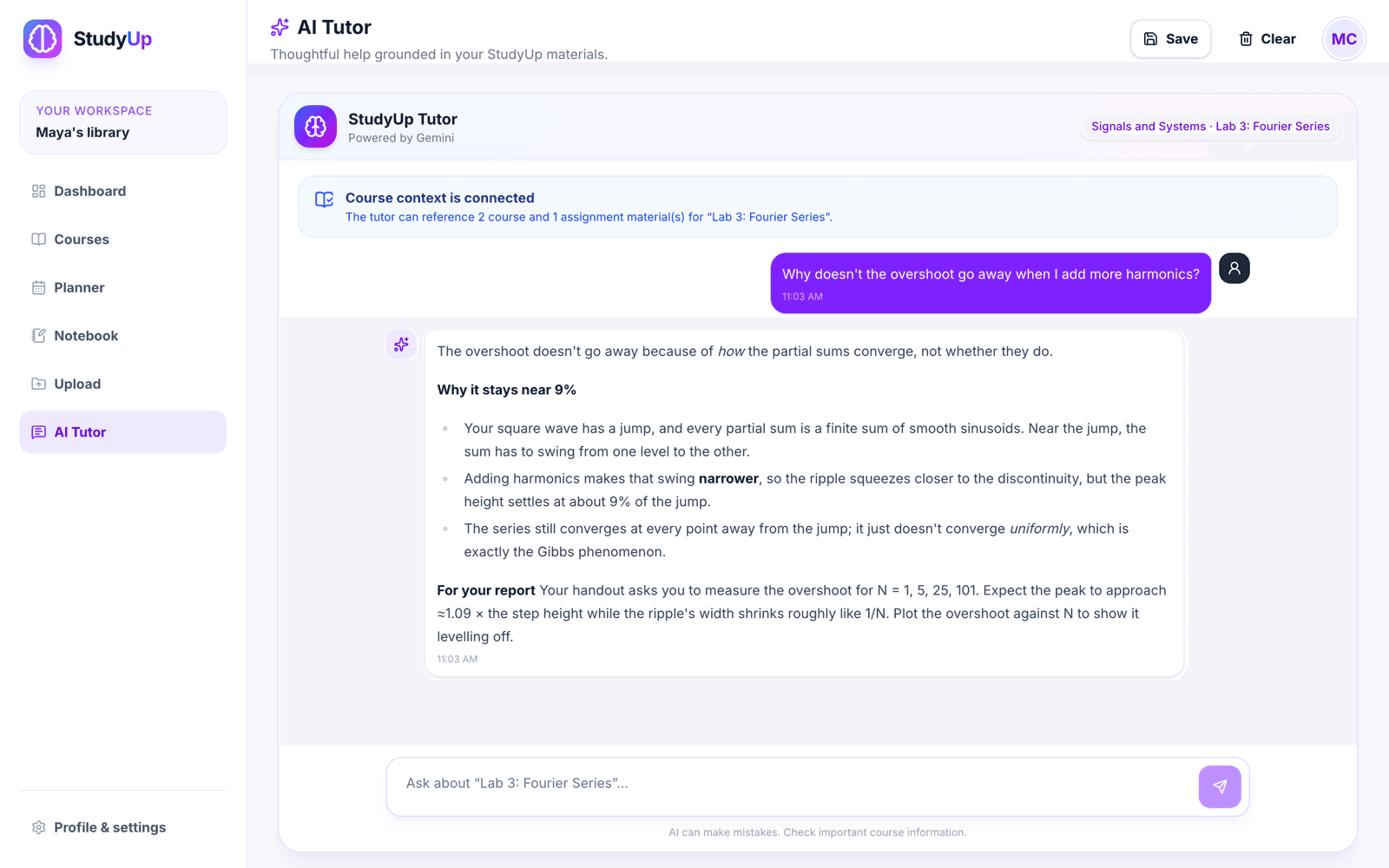
Open the tutor from an assignment and it already knows where you are: the course, the assignment and its description, the handout, and the rest of the course’s materials. A banner says exactly how much it can see, down to the number of documents, so you are never guessing whether it read the handout or is answering from general knowledge. Images go along as images, so a photographed whiteboard or a circuit diagram is something Gemini looks at rather than a filename it is told about.
That is what makes the answer about your lab instead of the topic. Ask why the overshoot will not go away and it explains the Gibbs phenomenon, then points at the four values of N your handout asks you to measure. Answers render as Markdown and type out as they appear. Conversations can be saved and linked to an assignment, where they wait on its page the next time you open it.
Study Plans and the Planner
Any assignment with a due date can turn into a plan. The server reads the assignment and up to five of its materials under your own permissions, asks Gemini for a JSON schedule, and then checks what came back. Every session has to parse, run between thirty minutes and two hours, and land before the deadline. A plan with a single session after the due date is rejected outright rather than quietly repaired, because a plan that is almost right about a deadline is worse than no plan at all.
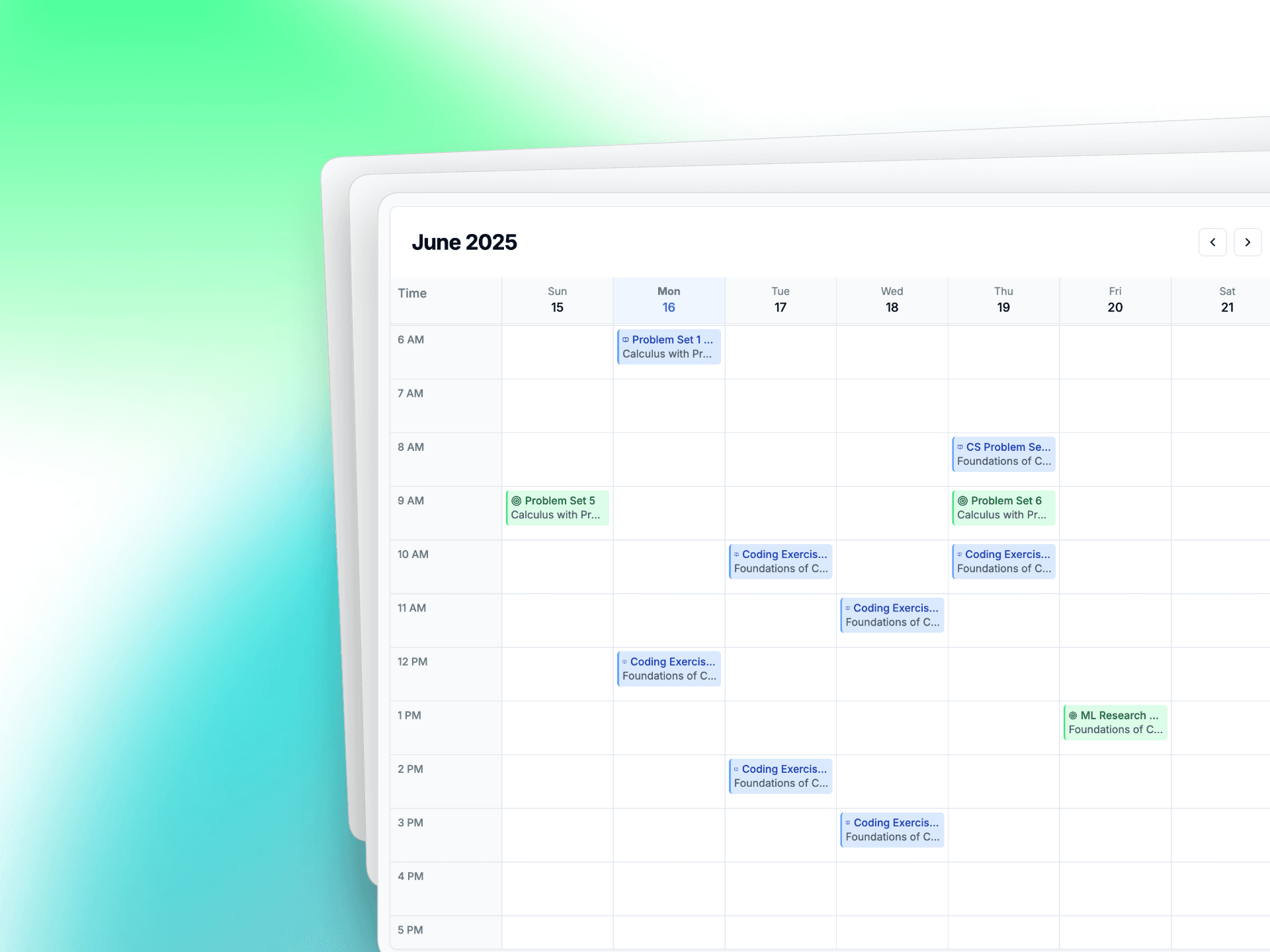
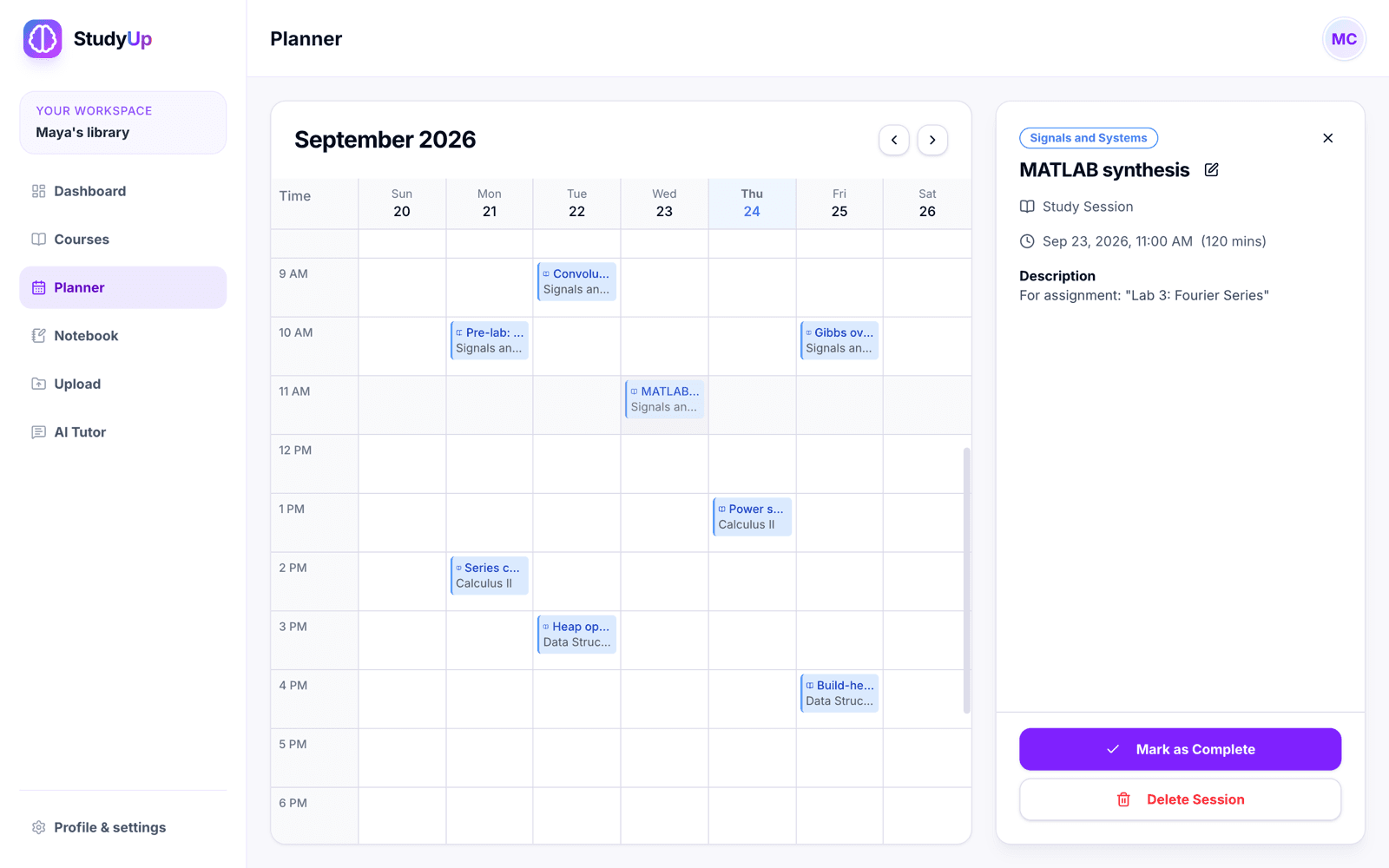
Accepted sessions land in the planner, a week grid alongside your assignments’ due dates. Select a session and the sidebar shows what it is for and which assignment it came from, and it can be marked complete, edited, or deleted from there. The grid works from the keyboard and by touch, not only with a mouse.
The Notebook
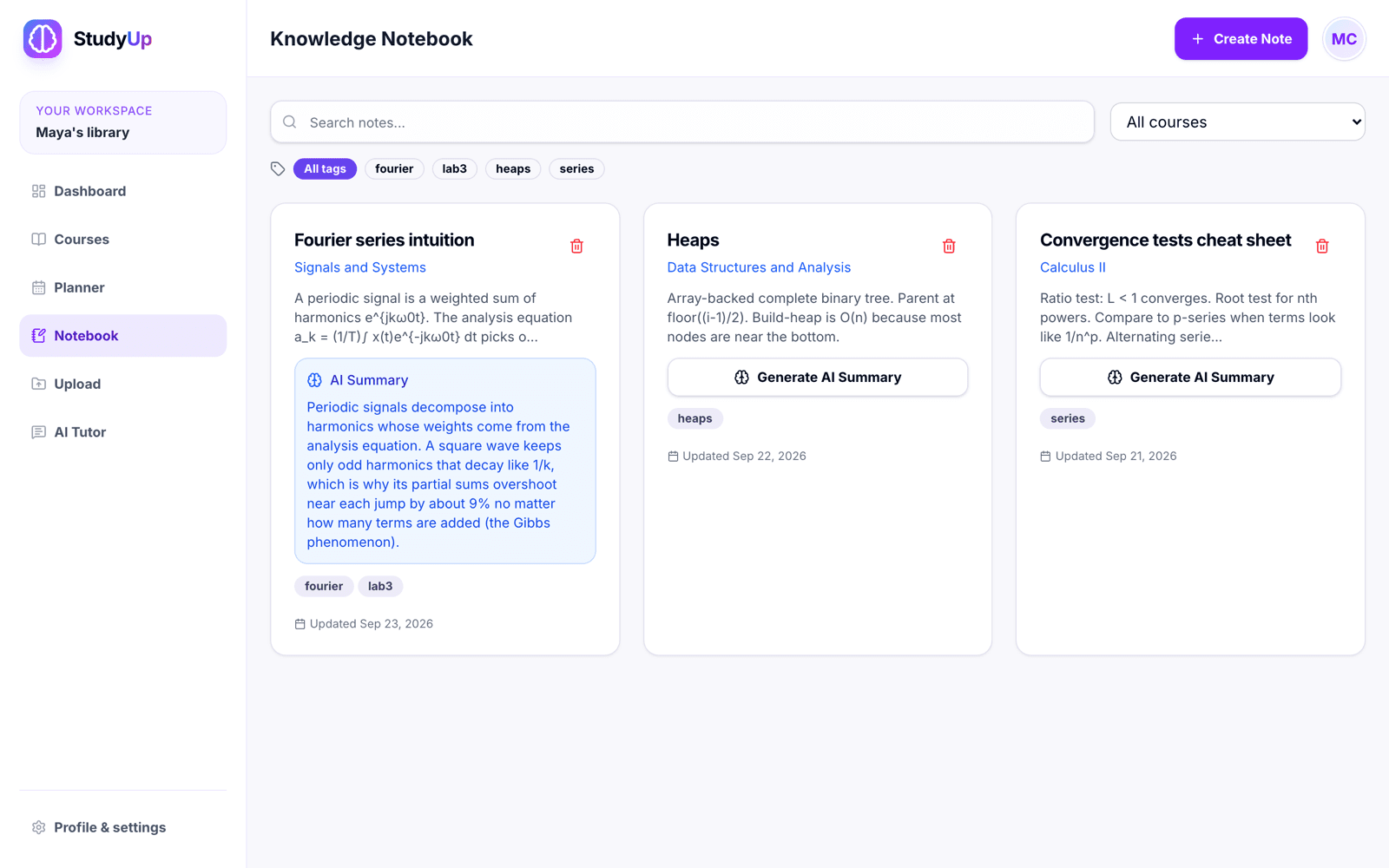
Notes are tagged and can belong to a course, with search and filtering by either. A note can be summarised in one click into a short paragraph of its most important ideas, shown on the note’s card rather than written into it. Each note keeps one current summary. Early versions happily created a new one every time, so the rebuild removed the duplicates and added a unique index to make sure it cannot happen again.
Architecture
StudyUp has no application server of its own. The front end is a static React 19 app built with Vite and served from Vercel, with TanStack Query handling data. Everything behind it is Supabase: Postgres, Auth, Storage, and two Deno Edge Functions that talk to Gemini.
That shape makes the security model simple to state and easy to get wrong. The browser holds a publishable key that anyone can read out of the JavaScript, so the key cannot be what protects anything. The database has to decide, on every row, who is allowed to see it, and the only code allowed to hold the Gemini key runs on the server.
Access
Row-level security is the authorisation boundary. Every table has policies keyed to the signed-in user, and ownership is checked across tables, not just on the row in front of you. A note can only point at a course you own, a study session only at your course, and a saved chat only at your assignment. Those checks run through two helpers, is_course_owner and is_course_owner_for_assignment, pinned to an empty search path so they cannot be redirected at a lookalike table.
Files follow the same rule. The materials bucket is private and capped at 20 MB a file, and its policies read the object’s path, so an upload into a course folder is only allowed if you own that course. Downloads go through signed URLs that expire after an hour.
Edge Functions
The two Edge Functions now treat every request as hostile until proven otherwise. A caller has to present a real user session, not just the public key. Bodies are read with a 100 KB ceiling enforced while streaming rather than after, messages and context have hard lengths, and CORS answers only for the exact production origins plus one narrow, HTTPS-only pattern for preview deployments. Anything unrecognised fails closed.
Images were the subtle one. The hackathon version fetched whatever URL the browser sent it, which is a server-side request forgery waiting to happen. Now an image has to come from this project’s own Storage, over HTTPS, with redirects refused, a ten-second timeout, and the 5 MB limit enforced on the bytes actually read rather than on a header that claims a size.
const fetchSupabaseImage = async (rawUrl: string, supabaseUrl: string) => {
	const imageUrl = new URL(rawUrl);
	const projectUrl = new URL(supabaseUrl);

	if (
		imageUrl.protocol !== "https:" ||
		imageUrl.hostname !== projectUrl.hostname ||
		!imageUrl.pathname.startsWith("/storage/v1/object/")
	) {
		throw new HttpError(400, "Images must come from this project's Supabase Storage");
	}

	const response = await fetch(imageUrl, {
		redirect: "error",
		signal: AbortSignal.timeout(10_000),
	});
	const contentType = response.headers.get("content-type")?.split(";")[0];
	if (!response.ok || !contentType?.startsWith("image/")) {
		throw new HttpError(400, "Could not load a valid image");
	}

	// The 5 MB cap is enforced on the bytes read, not the declared length.
	return { contentType, bytes: await readLimitedBody(response) };
};
supabase/functions/chat-with-gemini/index.ts — an image is only fetched from the project's own Storage.
The key moved too. It used to ride in the request URL, where URLs end up in logs, and now it goes in a header. The model is configuration rather than code, and every Gemini call runs under a thirty-second deadline.
Quotas
Every Gemini call costs money, and a public sign-up form means anyone can make an account. So each user gets 30 tutor messages an hour and 200 a day, and 10 study plans an hour and 40 a day, enforced in Postgres rather than in the function.
-- Serialize quota consumption for one user/function pair. This prevents two
-- concurrent requests from both observing the final available slot.
PERFORM pg_catalog.pg_advisory_xact_lock(
	pg_catalog.hashtextextended(v_user_id::text || ':' || p_function_name, 0)
);

IF v_hour_count >= v_hour_limit THEN
	RETURN QUERY SELECT false, 0, v_hour_start + interval '1 hour';
	RETURN;
END IF;

INSERT INTO public.ai_usage_windows
	(user_id, function_name, window_type, window_start, request_count)
VALUES
	(v_user_id, p_function_name, 'hour', v_hour_start, 1),
	(v_user_id, p_function_name, 'day', v_day_start, 1)
ON CONFLICT (user_id, function_name, window_type, window_start)
DO UPDATE SET request_count = public.ai_usage_windows.request_count + 1;
supabase/migrations/20260730010000_ai-usage-quotas.sql — one user, one function, one caller at a time.
The lock is the part that matters. Two requests arriving together would otherwise both read the last free slot and both be let through. Serialising on a per-user, per-function advisory lock makes the check and the increment one step. The usage table itself is invisible to users, and if the quota check fails for any reason the function refuses with a 503 rather than letting the call through unmetered.
Verification
Security that lives in database policies is only as good as the tests that replay them. Every migration is replayed against a disposable local Supabase stack, and 71 pgTAP assertions check the schema, the row-level security, the storage rules, tenant isolation, and the quotas. On top of that, integration tests sign in as two separate users and confirm neither can see the other’s courses, then upload a private file and download it back to compare the exact bytes.
The rest is layered to match. Vitest covers components and hooks with 100% thresholds on the pure utilities, Deno tests cover request parsing, CORS, and quota handling in the Edge Functions, and Playwright runs the product across Chromium, Firefox, WebKit, a Pixel, and an iPhone. It fails on console errors, accessibility regressions, horizontal overflow down to 320 pixels, offline-state bugs, and drift from a reviewed visual baseline. Performance has a budget too: bundle ceilings, a 125 KB stylesheet cap, and a load test that must hold a 500 ms p95.
Changes reach production through a permanent staging branch, and merging to main needs seven independent checks to pass. Actions are pinned to commits, secrets are scanned on push, and the live verification workflow runs against a deployment with two dedicated low-privilege accounts, so the cross-user checks can never silently skip.
Design
The hackathon build looked like what it was: stock components, a Lovable favicon, and a slightly different idea of spacing on every page. The redesign pulled it into one navigation shell, one page header, and one set of actions, with the brain mark and a blue to violet gradient carrying through the landing page, the tutor, and the primary buttons.
It is built for the laptop on a library desk first, and on a phone the sidebar folds into a rail of icons rather than disappearing. The tutor’s typing animation stops when the system asks for reduced motion, and the accessibility and layout checks in CI keep contrast, labelling, and narrow screens correct as pages change.
Decisions
Harden it, don't rewrite it
The product that won worked, and a room of judges understood it from a single pitch. Rewriting it would have spent the effort on the part that was already right, so the rebuild kept the interface and replaced what sat underneath it: policies, functions, quotas, tests, and deployment.
Extraction in the browser
PDFs are read on the student’s own machine, once, at upload. The server never parses an untrusted document, and the text is there for every later question. The cost is coverage: PDFs and plain text are read, while Word and PowerPoint files are stored for download without the tutor being able to see inside them.
Staging shares production's database
Supabase branching is not on the current plan, so the staging deployment runs against the main project, with row-level security and dedicated test accounts keeping users apart. The isolated topology is written down in the repo, but it is not live, and the docs say so rather than implying a separation that does not exist.
What’s Next
Retrieval is next. The tutor currently sends each connected material whole, and the function caps a question’s context at 50,000 characters, so a course with a long lecture PDF can push every question over the limit. Picking out the relevant passages instead of whole documents fixes that, cuts the cost of each answer, and lets the tutor say which page an answer came from.
After that, streaming. Answers are generated in full and then typed out, which looks live without being live, and a real stream would put the first words on screen as soon as Gemini has them. Reading Word and PowerPoint files, and a staging database of its own once the plan allows, round out the list.