Tools
- TypeScript
- Node.js 18+
- KaTeX fonts
- resvg or sharp
- kitty graphics
- iTerm2 images
- Sixel
- Vitest
Overview
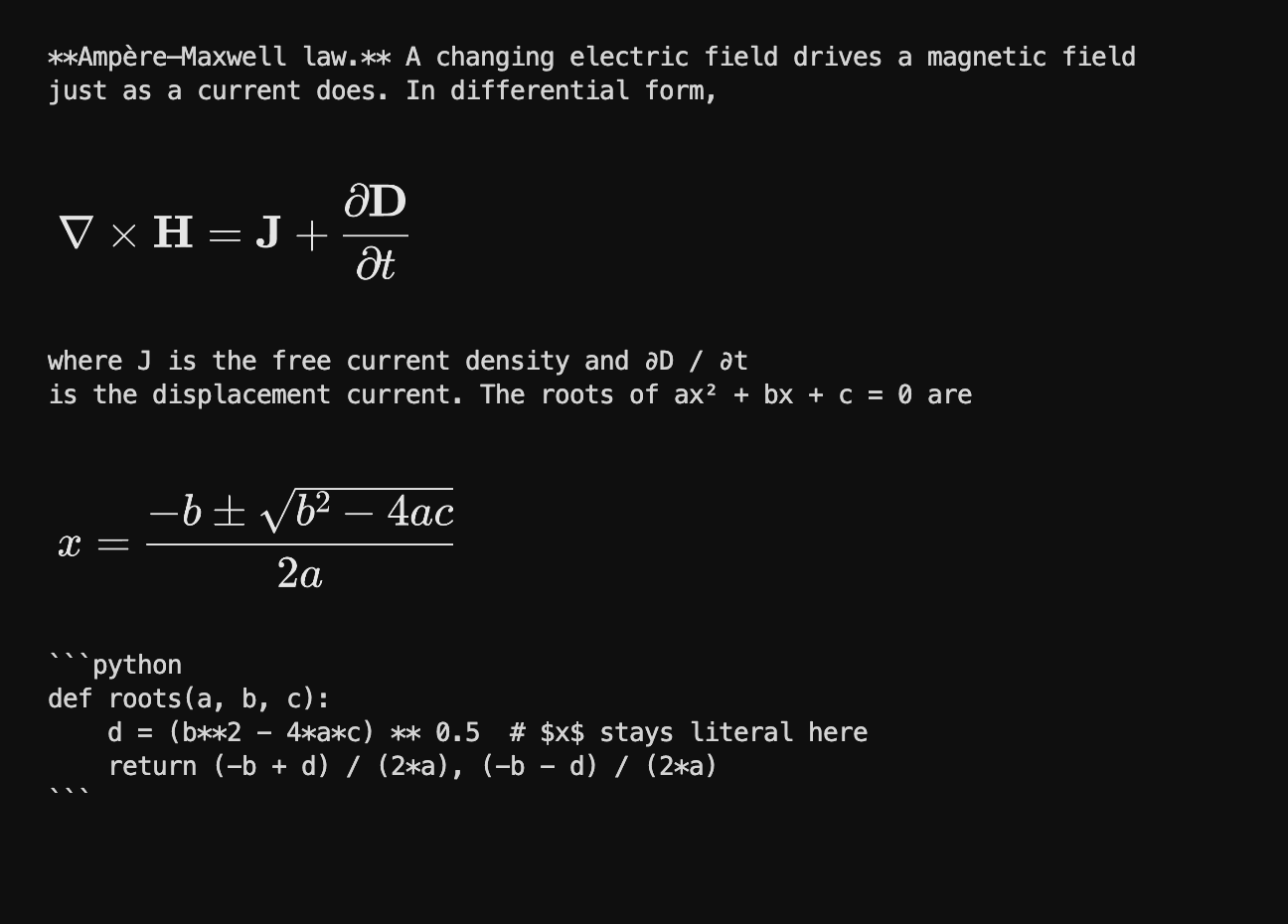
terminal-math renders LaTeX maths in the terminal. Give it a whole message, prose, Markdown, code and all, and it hands back a string where only the maths has changed: typeset Unicode in any terminal, ASCII where Unicode is unsafe, and real Computer Modern images in terminals that can show them. It is a TypeScript library and a CLI, with no required dependencies.
Team
The Problem
Language models write maths in LaTeX, because that is how maths is written everywhere they learned it. In a browser that is fine: the chat page runs KaTeX and the reader sees an equation. In a terminal nothing renders it, so an answer about Maxwell’s equations arrives as \frac{\partial \mathbf{D}}{\partial t} and the reader is left to typeset it in their head.
More and more of that reading happens in a terminal, inside Claude Code, Codex, and tools built like them. The existing options either flatten maths into a single line of substituted symbols, which breaks the moment there is a fraction, or render images through matplotlib, which needs Python and fails outright in the places people actually read these answers.
The Rule
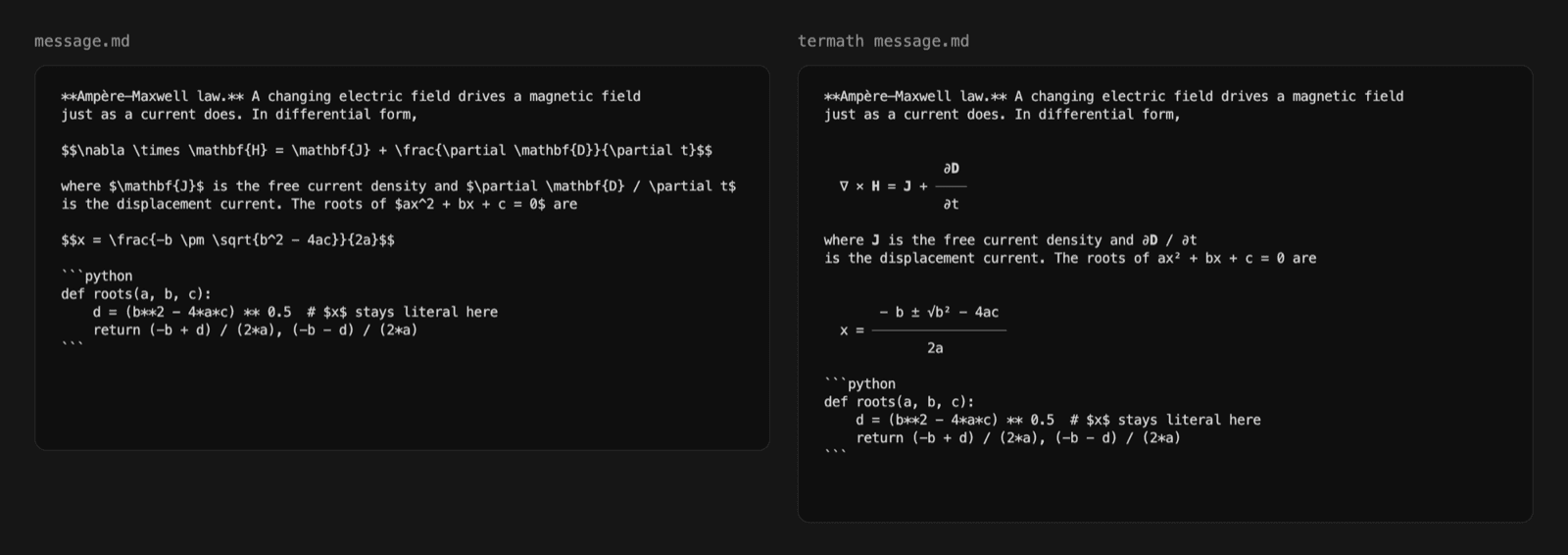
Change the maths and nothing else. Every character that is not maths comes out exactly as it went in.
That is what makes the library safe to put between a model and a screen. It can be handed an entire assistant message without the caller deciding what is maths first, and a code sample with a dollar sign in it, a Markdown table, or a line of prose survives byte for byte. The same rule shapes the output side: the library returns strings and never writes to the terminal itself, unless you explicitly ask it to probe one.
Whole Messages
A scanner walks the input line by line and hands out typed segments: fenced code, Markdown tables, display maths in $$ or \[ \], inline maths in $ or \( \), inline code, and plain text. Every character lands in exactly one segment, so reassembling them gives back the input, and only the maths segments are touched on the way through.
If a piece of maths does not parse, the default is to leave it as the original LaTeX rather than guess, so a malformed expression costs you a pretty rendering and never costs you the content.
The Ladder
Terminals vary more than any other display. So instead of one output format there is a ladder, kitty, iterm2, sixel, unicode, ascii, and the library walks down it until it reaches a rung the destination can actually display. The image rungs are real typesetting; the text rungs are a two-dimensional layout built from characters. There is always a rung that works.
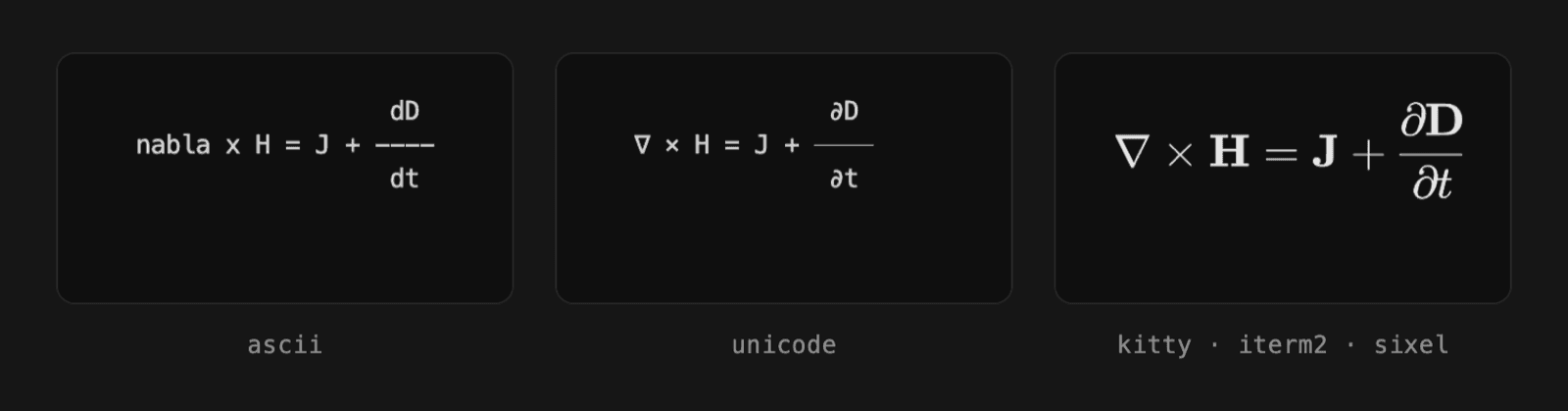
An image rung is skipped for concrete reasons: no rasteriser installed, output going to a pipe or a file, a screen session, tmux without passthrough turned on, an agent host in between, or an equation wider than the window. A clipped image loses information that wrapped text would keep, so width counts as a reason too. Inline maths stays text even on an image rung, because an image cannot be aligned to the baseline of the surrounding line reliably, and text can still be selected and copied.
Agent Hosts
Claude Code and Codex are the obvious places for this to run, and they are exactly where images cannot work. Model output is data to these hosts, not bytes for the terminal, and their interfaces repaint over anything drawn underneath them. The terminal may speak kitty perfectly well. The host in between does not.
So the library reports the host separately from the terminal, and refuses image modes whenever a host is present, saying why. termath --caps prints the whole decision.
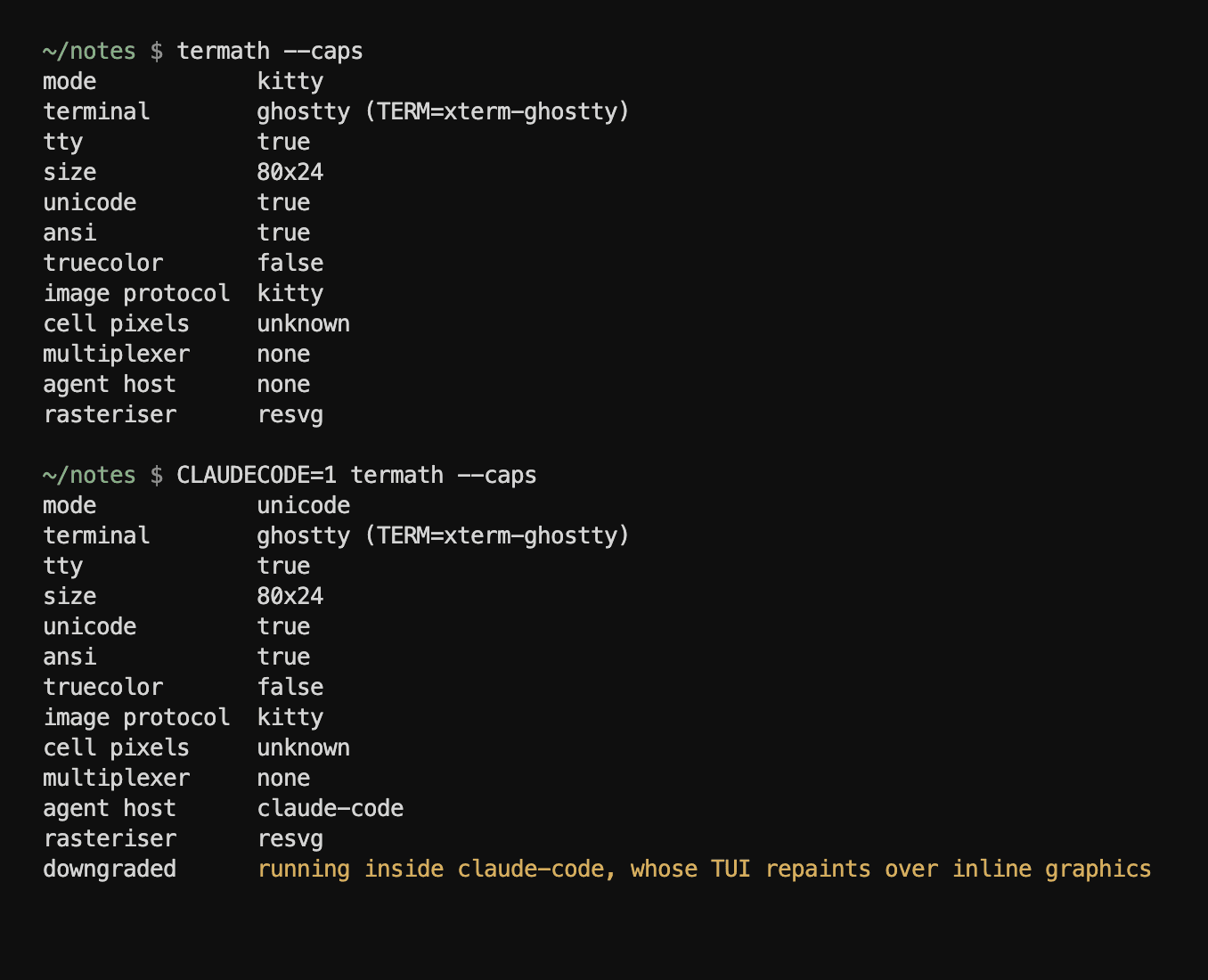
For those hosts there are two ways in. Their print modes write plain text, so claude -p "..." | termath --stream typesets the answer deterministically, with the model not involved at all. For interactive sessions, which cannot be piped, termath install-skill writes one skill directory that both hosts scan on startup, telling the model to run its draft through termath before answering. It touches no settings files and removes cleanly.
Architecture
There are two renderers, not one, and they share everything up to the syntax tree. A tokenizer and a recursive-descent parser turn the LaTeX into an AST covering scripts, fractions, roots, font commands, scaled delimiters, big operators, matrices, cases, accents and boxes. From there the text rungs and the image rungs go separate ways.
The split is the main design decision in the project, and it came from getting it wrong first. The early image path drew the character grid at high resolution, which produced monospace spacing and superscripts the same size as the base, and it looked wrong the moment it was not constrained to a grid. A grid asks what fits in a cell. A printed equation asks where a glyph belongs. Those are different questions, so they got different engines.
The Grid
The text renderer lays maths out as a Box: a grid of styled cells with a tracked baseline. Everything composes from a few primitives, and the important one is hcat, which joins boxes side by side aligned on their baselines rather than their tops. That is the whole reason J + sits level with the fraction bar in ∂D/∂t instead of with its numerator.
export function hcat(boxes: Box[], gap = 0): Box {
	const nonEmpty = boxes.filter((b) => b.width > 0 || b.height > 0);
	if (nonEmpty.length === 0) return blankBox(0, 1, 0);

	let above = 0;
	let below = 0;
	for (const b of nonEmpty) {
		if (b.baseline > above) above = b.baseline;
		const bel = b.height - b.baseline - 1;
		if (bel > below) below = bel;
	}
	const outHeight = above + 1 + below;
	const outBaseline = above;

	let totalW = 0;
	for (let i = 0; i < nonEmpty.length; i++) {
		totalW += nonEmpty[i]!.width;
		if (i > 0) totalW += gap;
	}

	const out = blankBox(totalW, outHeight, outBaseline);
	let x = 0;
	for (let i = 0; i < nonEmpty.length; i++) {
		const b = nonEmpty[i]!;
		const y = outBaseline - b.baseline;
		blit(out, b, x, y);
		x += b.width;
		if (i < nonEmpty.length - 1) x += gap;
	}
	return out;
}
src/core/box.ts — join boxes left to right, lined up on the baseline.
Unicode has superscript and subscript digits and a handful of letters, so x_1^2 becomes x₁² when every character has a small form, and falls back to a shifted box when it does not. ASCII mode keeps inline maths on one line in the linear form every plain-text reader already knows, x_1^2, and draws display fractions with dashes.
Typesetting
The image renderer is a small proportional layout engine that follows the TeXbook closely enough to look like it. Boxes carry a width, a height above the baseline and a depth below it, in em. Fractions sit on the maths axis with clearance around the rule, scripts scale to 70% and shift by TeX’s sup1 and sub1, large operators grow through the Size faces and take their limits above or beside depending on whether they are \sum or \int, and spacing between atoms comes from TeX’s class table.
Every box keeps its primitives in one flat coordinate space rather than nested transforms. Nested transforms are where engines like this usually go wrong, because a shift applied at the wrong level stays invisible until a deeply nested subscript drifts. With one space, the SVG emitter is a single pass with one flip of the y axis.
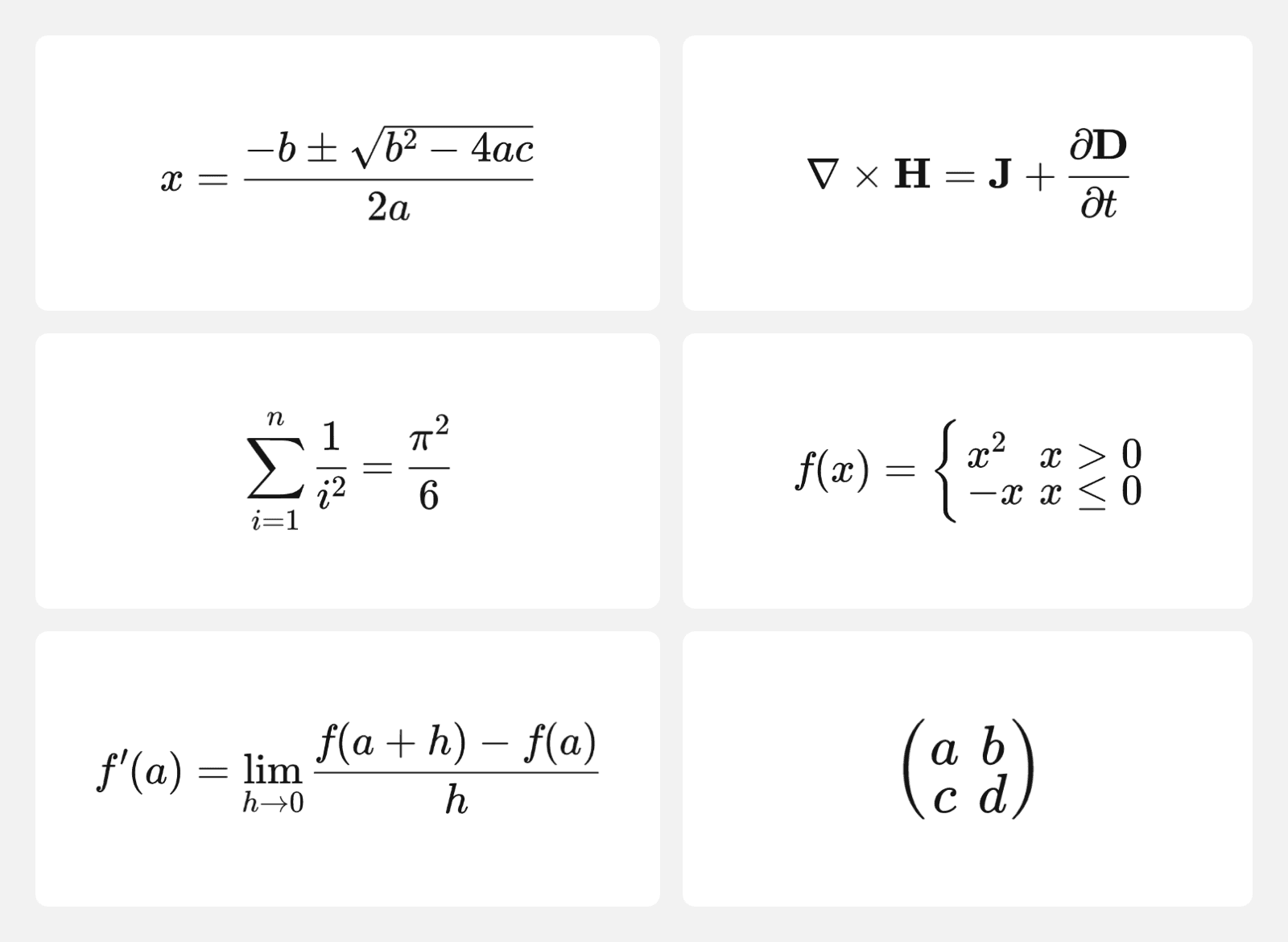
The fonts ship with the package: thirteen KaTeX faces of Computer Modern, about 346 KB, with per-glyph metrics generated from the KaTeX build. That is not polish. A stock Mac has none of the usual maths fonts, so a font-family list quietly falls back to Times and the output stops looking like mathematics. Bundling means an equation looks the same on every machine.
Protocols
The SVG is rasterised by whichever optional rasteriser is installed, resvg or sharp, and wrapped in the terminal’s protocol: kitty’s graphics protocol, iTerm2’s inline images, or sixel, with a tmux or screen envelope when needed. Without a rasteriser the ladder simply starts at Unicode.
Sixel is the awkward one, and it is written in plain TypeScript with no native dependency. It allows at most 256 colours and has no alpha channel, so the encoder uses median-cut quantisation, which suits images that are almost entirely greys, and treats alpha as a clean one-bit mask by default. Anti-aliased edges kept at full opacity would thicken every glyph and fill the palette with near-identical darks.
Detection reads the environment and never touches the terminal, so it is safe to call from inside another program. Asking the terminal directly, for its cell size or its graphics support, puts the terminal into raw mode and is strictly opt-in.
Streaming
Piping a model through termath and waiting for it to finish means staring at a blank screen, so --stream formats as the answer arrives. It buffers lines, tracks whether it is inside a code fence or a display block, and flushes everything up to the last line sitting outside both. A block is never split half-way.
The output is byte-identical to the batch path, which is fussier than it sounds. The newline between two flushes belongs to the second chunk, not the first; ending one chunk with it made the scanner add a blank line ahead of the next display block, so the newline is carried across the boundary instead.
Verification
187 tests across 14 files cover the scanner’s round-trip guarantee, the parser, both renderers, capability detection, mode picking, the protocol encoders, and streaming equivalence. CI runs them on Node 18, 20 and 22, and again with a rasteriser installed so the image path is exercised for real.
Decisions
Not a LaTeX engine
The parser covers the maths models actually write, not TeX. There are no macros, no packages, and no pretence of completeness, which is what keeps the library small, pure TypeScript, and fast enough to run on every message.
Rasterisers are optional
Zero required dependencies was worth more than images by default. resvg or sharp unlock the image rungs when installed, and without them nothing fails; the ladder starts one rung lower.
The pipe beats the skill
A skill depends on the model following instructions. A pipe does not involve the model at all. Both ship, but the docs recommend the pipe first, because formatting should not depend on whether the model remembered to do it.
What’s Next
Publishing is first. The package is built and tested but not yet on npm, and npm install is the whole point of a drop-in.
After that, the text rungs need the attention the image rung got. They set a leading minus as if it were subtraction, so -b comes out as - b, and ASCII mode still lets the integral and summation signs through as Unicode. Both are small fixes in a renderer that otherwise does exactly what the image path does, in characters.